Sidebar
Background Bitmaps in Rhino
When it comes to placing background bitmaps using the BackgroundBitmap command, bigger is not always better.
Rhino uses OpenGL to display and draw everything you see in a viewport. Image files, or bitmaps, are treated as OpenGL textures. OpenGL has limitations and specific requirements that must be met to create textures.
- The image dimensions must be a power of 2 in both width and height (i.e. 512 x 512, 1024 x 512, 2048 x 4906, etc.).
- The overall image size must not exceed the limitations imposed by the video hardware or video driver. This is video card dependent.
If this criteria is not met, then the image will not display at all.
More information
Because of the above limitations, Rhino will ensure that all images follow these rules. In many cases will have to resize and adjust the image accordingly.
If you go into Rhino 5's Tools→Options…→Rhino Options→View→OpenGL page you will see what the maximum size a texture can be on your card:
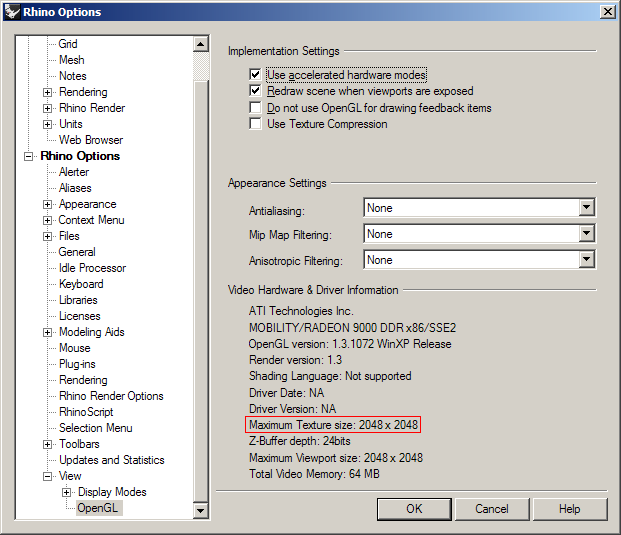
In Rhino 4, the page is Tools→Options→Appearance→OpenGL:

Troubleshooting
When troubleshooting background bitmap problems, first make sure you have the latest video driver from your video card manufacturer.
If you are having problems displaying background bitmaps, you might try resizing your images yourself, using your favorite image editing application, so that they meet these criteria. Generally speaking, image sizes of 2048 x 2048 support most mid-range video cards.
Keep in mind that just because you can load an image that is 1000000 x 1000000 in resolution does not mean Rhino will use this resolution. You might feel that 2048 x 2048 is too low of a resolution to see the details you want. But, if 2048 x 2048 is your card's limit, then that is the resolution that Rhino will use.
If an image shows as a white rectangle, try changing the image’s side length (in pixels) to be divisible by four.
rhino/backgroundbitmap.txt · Last modified: 2020/08/14 (external edit)

